
2 to 6 h
average latency when detection relies on daily rounds or BI exports. Unacceptable on DC in retail sites.
Email or SMS, per-technician on-call routing, translated manufacturer codes, customizable SoC thresholds. Your field teams act on a reliable signal — not an angry customer call.
Beyond a few dozen chargers, faults become statistical. The question is no longer « will it break? » but « how long until we know? ». And as long as we know after the customer, we've already lost control.
average latency when detection relies on daily rounds or BI exports. Unacceptable on DC in retail sites.
The charger 'charges' but the vehicle receives nothing. From OCPP logs, everything looks fine — exactly the blind spot of naive systems.
Manufacturer codes are unreadable without the spec sheet — your technician loses 15 minutes translating before acting.
More than raw detection: business rules built for the real life of a charger fleet.
A charger no longer responding on OCPP — detection in minutes rather than hours. Stops you from discovering the outage via an unhappy customer call.
Standard OCPP errors and manufacturer codes (Alpitronic, Delta, Siemens, Kempower, Legrand, Schneider, Alfen…). No drowning in logs.
You set your own thresholds — for example: « if SoC < 40% and no progress for 20 minutes, notify ». Catches the charger that 'charges' without sending anything to the vehicle.
From the daily volume of OCPP exchanges across your chargers, the module identifies and translates manufacturer codes — your technicians know what the alert means before they've even opened the console.
Multiple recipients per alert type. Readable formatting straight in the on-call technician's inbox.
For critical alerts that can't wait for an inbox to open. Especially outside business hours.
Fine selection of one or more recipients for each alert type. Weekend on-call isn't the same as weekday on-call.
Each depot, each site has its own local team. Alerts from a given site go to the technicians assigned to it.
Filterable list by priority, source type, period. One-click acknowledgment, direct link to the maintenance record of the affected charger.
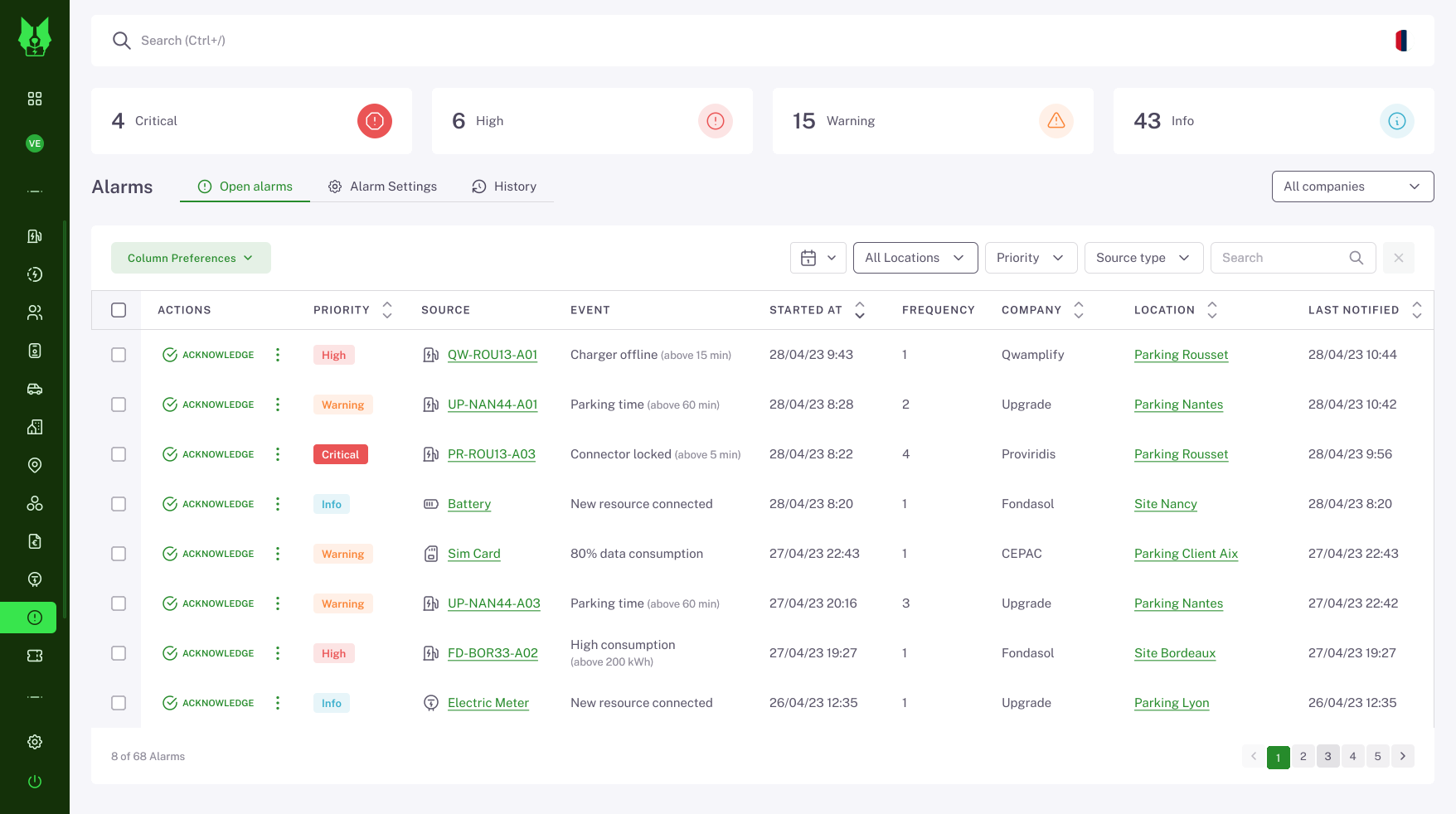
Selection in a dedicated console: disconnections, errors, SoC thresholds, incident types. Enable/disable per site, per charger group.
For each alert type, your criteria: minimum error duration, SoC level, manufacturer codes to surface.
Email, SMS, or both. Routing per technician, per group, per site. Respects on-call schedules.
Each alert attaches to the maintenance record of the relevant charger. Incident history stays available to prepare the next field visit.
You manage a geographically dispersed fleet and can't afford to discover faults via end users.
You have contractual SLAs with your clients — and you want to detect issues before they call.
You supervise dozens of sites for different clients — each site needs its own on-call routing.
Near real-time detection of disconnected chargers — no waiting for the daily round.
Your technicians intervene before the user picks up the phone.
Contractual commitments measurable and held. Proof via the Availability dashboard.
Dedicated no-code console. No support ticket to tweak a threshold.
Paired with the Availability dashboard, the alerts module closes the loop: real-time detection + historical proof of SLA compliance. Your sales team can finally promise service commitments in front of a demanding B2B client.
Spend 20 minutes with us on your fleet and maintenance process — we'll show you how to shift to proactive detection.
Book a demo